
New Noctule 4.0 released →
Your Swift project, in your IDE.
Noctule is a plugin that turns JetBrains IDEs and Android Studio into a Swift IDE — on macOS, Linux and Windows.
JetBrains retired AppCode and, with 2026.3, ended its last Swift support.
- Swift Package Manager and Xcode projects
- Build, run, test and debug from inside the IDE
- Completion, navigation and refactorings from Apple’s SourceKit-LSP
- Swift and Objective-C in the same project
Most features are free forever. The paid ones are included in a free 10-day trial; after that they need a license.
- JetBrains IDEs 2026.1 or later
- Android Studio Quail or later
- macOS · Linux · Windows
- Remote development
- WSL · Dev Containers
One IDE for every kind of Swift work
Whether Swift is your whole project or just one corner of it, Noctule fits the way you work.
Server-side & cross-platform Swift
For backends, command-line tools and libraries. Build, run and test Swift
packages on Linux, Windows and macOS, with toolchains from Swiftly, $PATH
or WSL — no Mac required.
Apple apps, in a JetBrains IDE
For iOS and macOS developers who prefer JetBrains: keep your keymap, plugins and tools for your Xcode projects. Xcode stays installed, but you rarely need to open it. Xcode support comes with a license.
What you get
The features you expect from a JetBrains IDE, for Swift.
Code insight
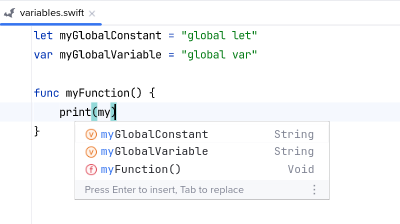
Completion, go to declaration and implementation, find usages, rename refactoring, type and call hierarchies, quick documentation — and more.
Swift Package Manager
Automatic detection, a “New Project” wizard, and run configurations for
swift build, swift run and swift test.
Xcode projects Paid
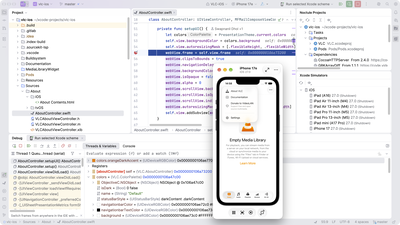
Code insight in Xcode projects, scheme and destination pickers in the toolbar,
xcodebuild builds, run configurations for the simulator and a tool window to
manage simulators.
Objective-C Free + paid
Objective-C alongside Swift, for mixed codebases. Highlighting and formatting are free, a license adds completion, navigation and diagnostics.
Debugger Paid
Debug Swift, Objective-C and C in one session with lldb-dap — packages,
tests and simulator apps. Conditional breakpoints, breakpoints on thrown
errors, watchpoints, Evaluate Expression and an LLDB console.
Formatting & linting Free + paid
A built-in formatter, free for everyone. A license adds SwiftLint and SwiftFormat diagnostics, format on save, and completion in their configuration files.
Test runner Paid
Run whole suites or individual tests from the gutter and see the results in the IDE’s own test runner.
Remote development
Run the IDE backend where your toolchain is — a remote machine, WSL or a Dev Container — and work from anywhere. Language support and build logs follow you to the frontend.
Up and running in three steps
No separate IDE to install and no project to convert.
- 1
Install the plugin
In your IDE, at Settings › Plugins › Marketplace, search for Noctule. Installation guide →
- 2
Open your project
A Swift package or an Xcode workspace. Noctule finds your toolchain — Swiftly, Xcode or
$PATH— on its own. - 3
Build, run and test
Swift packages build and run right away. Xcode integration, the test runner and the debugger need a license or the free trial.
Free to use. $39 a year unlocks the rest.
The features below need a license or the free trial. A license also supports Noctule’s ongoing development.
- Xcode support
- Debugger
- Test runner
- Objective-C
- SwiftLint & SwiftFormat
- Format on save
- Duplicate code
- Plist viewer
Individuals
For developers paying for their own license.
- Every paid feature
- Personal license, owned by you
- Commercial development
Organizations
For licenses paid by a company or team.
- Every paid feature
- Owned by your organization
- Commercial development
- Reassign licenses within your team
Open Source
For non-commercial projects in the JetBrains open-source program.
- Every paid feature
- No payment, no credit card
Try everything for 10 days
The trial includes every paid feature. Everyone can start it once per major version of Noctule, in the IDE at Help › Manage Subscriptions… › Noctule.
- Billing and invoicing by the JetBrains Marketplace
- Cancel at any time
- Free for approved open-source projects
Prices in USD. Sales tax or VAT may apply, depending on your location.
Common questions
Which IDEs are compatible with Noctule?
JetBrains IDEs from version 2026.1 on, for example IntelliJ IDEA, CLion, RustRover, GoLand, PyCharm and WebStorm, as well as Android Studio Quail or later.
Install it from the JetBrains Marketplace or from Settings › Plugins inside the IDE.
Is Noctule a replacement for AppCode?
Noctule brings Swift back to JetBrains IDEs after JetBrains discontinued AppCode. Unlike AppCode it is a plugin, so you keep working in your JetBrains IDE, and it also runs on Linux and Windows. It is an independent product and not developed by JetBrains.
Do I need a Mac for Swift development with Noctule?
No. Swift Package Manager projects work the same on macOS, Linux and Windows, which makes Noctule a good fit for server-side Swift, command-line tools and libraries. Only Xcode project support needs a Mac with Xcode installed. Even that Mac can be remote: with JetBrains remote development, the IDE backend runs on the Mac while you work from any machine.
Do I still need Xcode to use Noctule?
Only for Xcode projects. Noctule builds them with xcodebuild, lets you choose scheme and destination like in Xcode, and runs apps in the iOS simulator, so Xcode must be installed but you rarely need to open it. Xcode support needs a license or the free trial. Swift packages need just a Swift toolchain, on any operating system.
Is Noctule free?
Most of it, for as long as you like.
A license unlocks the paid features and costs $39 a year or $3.90 a month for individuals. A free 10-day trial includes them all, and approved open-source projects get a free license.
How do code completion and navigation work in Noctule?
Completion, navigation, find usages, rename and diagnostics come from Apple’s SourceKit-LSP, the same language server Xcode uses, so results match the compiler. The plugin itself provides syntax highlighting, the structure view, formatting, build integration and run configurations.
Does Noctule work in Android Studio?
Yes, Android Studio Quail or later, with the same SourceKit-LSP language support as in the other JetBrains IDEs. Android Studio hides some platform UI, so a few of Noctule’s tool windows and actions may not be available there.
Can I debug Swift code with Noctule?
Yes. Noctule debugs Swift, Objective-C and C with lldb-dap of the Swift toolchain: Swift packages, tests, and Xcode apps in the simulator. It supports conditional breakpoints, breakpoints on thrown Swift errors, watchpoints, Evaluate Expression and an LLDB console. Every run configuration except the build-only ones can be started with the debugger. The debugger needs a license or the free trial.
Try Noctule in your IDE
Install it from Settings › Plugins in your IDE and open a Swift project. Start the 10-day trial to try the paid features as well.
Questions or problems? Ask in the discussions, file a bug report or contact support.