Navigating in Source Code#
Noctule provides powerful features to navigate your Swift and Objective-C source files.
The global navigation actions are backed by SourceKit-LSP and work in Swift and Objective-C alike. The structure view is currently implemented for Swift only.
Navigation in a File#
Structure View#
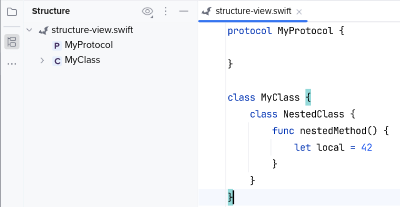
The structure view tool window displays an outline of the current Swift file. Open it at View → Tool Windows → Structure, or as a popup with Navigate → File Structure.
Breadcrumbs and Navigation Bar#
The declaration surrounding the text caret is shown in the breadcrumbs below the editor and in the navigation bar above it. Both let you jump to an enclosing type or function.
Global Navigation#
Go to Declaration#
You can invoke Navigate → Declaration or Usages on a reference to navigate to its declaration.
Go to Implementation#
You can invoke Navigate → Implementation(s) on a protocol or class to navigate to the available implementations.
Find Usages#
You can invoke Edit → Find Usages → Find Usages on a declaration to show the list of usages in the current project.
Invoking Navigate → Declaration or Usages on a declaration shows the same list, because there is no declaration left to jump to.
Go to Symbol#
The names of declarations contained in Swift files are included in the Navigate → Symbol… search.
Call Hierarchy#
Caller and callee hierarchies are available via Navigate → Call Hierarchy…. Place the text caret on a reference or on a declaration of a function and invoke the action.
Type Hierarchy#
Type hierarchy navigation is available via Navigate → Type Hierarchy…. Place the text caret on a reference or on a declaration of a type and invoke the action.