Creating a Swift Package Manager Project#
To create a new Swift PM project, open the wizard with File → New Project… → Swift Package. Under the hood, Noctule executes swift package init to create the new project. The wizard provides a user interface to configure the settings passed to this command.
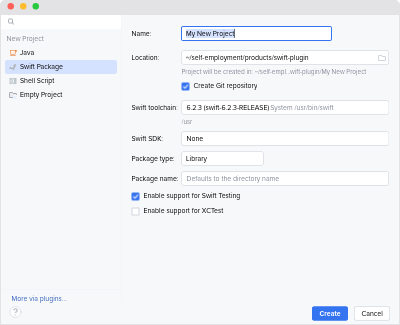
Options#
- Name
- The name of the project. It’s used by the IDE and also serves as the default value for the package name input.
- Location
- The parent directory for the new project directory.
- Swift Toolchain
- Defines the default Swift toolchain for the new project.
It is also used to execute the
swiftcommand to create the new project. - Swift SDK
- Defines the default SDK for the new project. By default, no SDK is configured and Swift’s defaults are used.
- Package Type
- The type of package to create. It’s passed as the value for
--typeofswift package init. - Package Name
- The name of the package. If defined, it’s passed as the value for
--nameofswift package init. - Enable support for Swift Testing
- Whether to enable support for Swift Testing.
If enabled,
--enable-swift-testingis passed toswift package init. Otherwise,--disable-swift-testingis passed. This option is grayed out if the selected Swift toolchain does not support it. - Enable support for XCTest
- Whether to enable support for XCTest.
If enabled,
--enable-xctestis passed toswift package init. Otherwise,--disable-xctestis passed. This option is grayed out if the selected Swift toolchain does not support it.