
Noctule 4.0 is a new major version with new features and a long list of bug fixes and improvements. Debugger support and improved Xcode integration are the most important changes.
Refer to the detailed changelog for the full list. A summary of the changes is below.
Try the paid features for free – the trial period is now 10 days.
System Requirements and Supported Environment#
Noctule 4.0 requires JetBrains IDEs version 2026.1 or later or Android Studio Quail or later. Support for 2025.3 was dropped.
Development inside Development Containers is supported now. Only paid JetBrains IDEs can open projects inside development containers, though.
WSL is now better integrated. If your WSL or Dev Container has Swift or tools like SwiftFormat or SwiftLint installed, then Noctule will find and use them.
Plugins need dedicated support for these environments. Noctule now has that support and finally lets you develop your Swift projects inside a Linux Docker container on your Mac, for example.
Debugger Support#
A major gap of Noctule was the missing debugger. With version 4.0, that gap has been closed and a fully-featured debugger is available now. It’s a paid feature of Noctule.
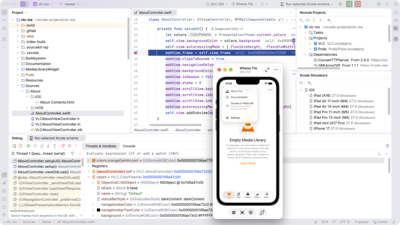
Debugging is available in all of these places:
- in SwiftPM
swift runandswift testrun configurations - in Xcode simulator run configurations
- in your unit tests alongside the test runner UI (SPM and Xcode)
- in Dev Containers
- in Windows WSL projects
Line breakpoints, exception breakpoints, conditional breakpoints and more are supported.
Noctule’s debugger also provides more advanced features:
- Readable values of
DecimalorDurationin the variables view - Rendering variables as hexadecimal
- Support for the “Hide library frames” filter to only display your own project’s stack frames
- Debugging of projects mixing Swift and Objective-C
- Disassembly view of frames without available sources
- Memory view of variable values
Improved Language Support#
Expand Macro is now available on references to macros in your editor. It displays the expanded result in a new popup editor.
Spell checking in comments and strings has been improved.
Duplicated code fragments are now highlighted in your Swift and Objective-C code. It’s a paid feature of Noctule and only available with a paid license of your IDE. Noctule integrates with your IDE’s inspection Preferences… → Editor → Inspections → General → Duplicated Code Fragment, which detects duplicate fragments in your project. Please refer to JetBrains’ manual page on duplicated code to learn how to use the inspection.
Many gaps and bugs in the lexer, parser, highlighting and the built-in formatter have been resolved.
Better Xcode Integration#
The new project format of Xcode 27 is now supported, for example when you import such a project into Noctule.
Noctule’s dropdowns in the IDE’s main toolbar have been improved for usability. For example, you can now launch “Run” and “Debug” directly from a destination item instead of selecting it first and then running it.
The action button next to the destination dropdown lets you choose between Run, Debug, Test and Build. Each of these actions creates a run configuration, which uses the currently selected scheme and destination.
The new option “Use selected scheme and destination” of Xcode run configurations now picks the selected values from Noctule’s dropdown for scheme and destination. Noctule now just creates one run configuration of each type (run, debug, test, build) when you launch from its toolbar action. Before, new run configurations were created for each pair of scheme and destination.
A new “Xcode Test” run configuration runs the tests of your Xcode project with Noctule’s integrated test runner, including support for debugging.
Noctule needs xcode-build-server to fully support Xcode projects. You are now notified if it’s not yet available on your Mac. If Homebrew is installed, you can tell Noctule to install the package with the brew command.
Many other improvements and bug fixes were applied to Noctule’s Xcode support. The changelog has the complete list, if you are interested.
Test Runner#
Noctule’s test runner now supports test output of XCTest-based tests.
Tests of an Xcode project are now detected and executed with the new “Xcode Test” run configuration.
SwiftLint Support#
With Noctule 4.0, SwiftLint warnings can now be suppressed with a SwiftLint comment on the current line, the previous line or the next line.
Better Project Management and Overview#
The new tool window “Noctule Projects” in the right sidebar of the main window provides an overview of the imported projects and their structure.
The tool window lets you add new Swift projects, sync existing ones, navigate the project structure and launch build actions from the context menu.
Breaking Changes#
A few settings and defaults had to be changed to fix problems and bugs.
- Setting Automatically detect new Swift workspaces is now off by default.
- The paths of SwiftLint, SwiftFormat and xcode-build-server are now project settings.
- Noctule for 2026.2 requires 2026.2.1 or later.
- Noctule can’t be enabled together with the “Swift Pro” plugin, because both provide support for the Swift language.
Miscellaneous Improvements and Bug Fixes#
.xcconfigfiles are supported with highlighting, commenting and navigation.- Run markers in
Package.swiftrun, debug, test and build the targets of a Swift package. Ctrl+Click navigates to targets, products and dependencies. - New SwiftPM options “Build system” and “Extra arguments”, shared with SourceKit-LSP.
- “Complete Current Statement” is available for Swift.
- File paths in the run consoles and the build output, e.g. of compiler errors, are now links.
swift buildandswift testno longer hang in several situations.
Refer to the detailed changelog for the full list.